When building or buying a home, you probably have a wish list. Whether you are drawn to the home due to its overall aesthetic or location you may fall short of some of the items listed. As your family and finances grow, why not allow for your house to grow alongside. When buying or building a house there are a few things that you can look for to assure you that your design can adapt with you.
During the search or design of your new home the floor plan plays a key role in the future ability for growth. Unfinished basements and attics with connections to the outside with comfortable overhead clearance are perfect for later adding space. This approach is the easiest and most cost effective as it allows you to grow your space without building new space outside the envelope of your existing home.
When remodeling or adding on it is best to maintain the integrity of your existing home, making sure that the work enhances the overall plan rather than detracting from what is there. The floor plan’s adjacencies to other rooms as well as to the outside can make for a seamless expansion of space. Floor plans and sites that allow for clear circulation to the addition are key. For example a bathroom, closet or laundry room at the end of a hallway on an exterior wall would be a great place to add onto. This will maintain a clear circulation path to the new addition.
So remember when you are out on the hunt for your next home do not get discouraged if it does not meet every criteria on your list. Simply select a design that can grow alongside you and your family.

Friday, March 29, 2013


Friday, March 8, 2013
Generators: Another Source of Comfort and Security
Generators! I love generators. They can really make life simple when life gets difficult due to adverse weather, local earthwork, a vehicle running into a power pole, or even routine service. Very hot days and very cold days may cause a power utility to “brown out” a neighborhood. I have lived in many climate zones and have lost power for many reasons. Some of my homes had provisions for temporary power but most did not.
Recently a client called. “John, I hate to be a bother, but the power in our new home is acting weird. Only about half of our electrical fixtures are working. I have walked the entire home and it is weird.” This had happen to my home just a few weeks earlier, but I thought there was no way it could have been the same problem of an old underground line being corroded. This was a brand new home we recently completed. I had supervised the install of all the utilities at their home. I asked if they had had any other underground work done since moving in and the answer was no. Almost as an afterthought she added: “It seems everything we need is running but a lot of circuits are not.”
Ah hah! My old gray mind finally clicked. Was the generator running, I asked? She could not hear it. I asked that she check and, sure enough, it was quietly purring away. Sweet!
Because the home network and computers were on the generator powered circuits, she was able to bring up the website for the power utility and discovered an outage had been reported. She was amazed that it was so simple. The security system did not issue a peep. The switch over was so quick and seamless that she had not noticed the change. This was a comfort for her and she was able to go back to work, telecommuting.
While recently attending the International Builders Show, I spoke to Generac, a leading manufacture of generators, to learn about whole house generator coverage. It’s a challenge, because you want strike a balance between cost, complexity and benefit. Generac has a new Nexus breaker panel that does the trick. It can handle up to 6 large 220 circuits. In effect, it manages large loads and the starting of big motors such as heating elements, air conditioning, well pumps, septic pumps, electric stoves, or water heaters. It allows only one or two of these to start or operate at the same time, essentially managing the house loads and telling the generator how hard to work. In the homes we design and build, the remaining electrical loads are generally light. CFL and LED lighting use tiny amounts of energy. Energy star appliances sip energy. WaterSense fixtures use less water allowing well and septic pumps to work less. What that means is that the same generator that is usually specified for partial home coverage may service an entire BuildSense or other energy efficient home.
Recently a client called. “John, I hate to be a bother, but the power in our new home is acting weird. Only about half of our electrical fixtures are working. I have walked the entire home and it is weird.” This had happen to my home just a few weeks earlier, but I thought there was no way it could have been the same problem of an old underground line being corroded. This was a brand new home we recently completed. I had supervised the install of all the utilities at their home. I asked if they had had any other underground work done since moving in and the answer was no. Almost as an afterthought she added: “It seems everything we need is running but a lot of circuits are not.”
Ah hah! My old gray mind finally clicked. Was the generator running, I asked? She could not hear it. I asked that she check and, sure enough, it was quietly purring away. Sweet!
Because the home network and computers were on the generator powered circuits, she was able to bring up the website for the power utility and discovered an outage had been reported. She was amazed that it was so simple. The security system did not issue a peep. The switch over was so quick and seamless that she had not noticed the change. This was a comfort for her and she was able to go back to work, telecommuting.
While recently attending the International Builders Show, I spoke to Generac, a leading manufacture of generators, to learn about whole house generator coverage. It’s a challenge, because you want strike a balance between cost, complexity and benefit. Generac has a new Nexus breaker panel that does the trick. It can handle up to 6 large 220 circuits. In effect, it manages large loads and the starting of big motors such as heating elements, air conditioning, well pumps, septic pumps, electric stoves, or water heaters. It allows only one or two of these to start or operate at the same time, essentially managing the house loads and telling the generator how hard to work. In the homes we design and build, the remaining electrical loads are generally light. CFL and LED lighting use tiny amounts of energy. Energy star appliances sip energy. WaterSense fixtures use less water allowing well and septic pumps to work less. What that means is that the same generator that is usually specified for partial home coverage may service an entire BuildSense or other energy efficient home.
Sunday, March 3, 2013
What Does the Builder Want?
That is the most important thing, isn’t it? Or, wait, maybe not. Shouldn’t your choices drive your project? A loosely designed and defined and unspecified project delivers what the builder wants. A thoughtfully and thoroughly designed and fully specified project delivers what you want. It’s as simple as that. Odds are there will not be full alignment of goals between you and your builder. Some cases may be closer than others, but the likelihood of perfect alignment is slim to none.
I’ve heard people say many times that specifications drive up cost. This is absolutely true. Here, the old adage you get what you pay for applies. Take windows, for example. There are a vast array of choices that cover the gamut of finishes, color, performance, durability, glazing, cost, and materials. If performance (sun-tempered house), exterior color (red), and materials (wood interior) are most important to you and durability (limited warranty effort) and cost (keep the bid low) are most important to the builder, you have a discrepancy and a problem if your choice is not specified. Just as it is your choice whether you spend your money on a BMW or a Ford Fiesta, it is your choice whether you buy high-end clad wood windows or vinyl windows. A high performance BMW costs about 500% (yup) more than a Ford Fiesta. The range for window cost is just as extreme.
When price shopping, it is impossible to have apples-to-apples cost information without thorough plans and full specifications - Period. How can you place a price tag on a project if you don’t know what you are pricing? I’ve heard countless times from owners and builders that a basic plan and elevations (schematic level design) are sufficient for pricing, permitting, and building. This is absolutely not true. One of my many favorite examples of this desperate and unfortunate process is pricing without a power and lighting plan. We find that our clients are quite particular (and rightly so) about lighting locations and fixtures, switching, power locations, data locations, media locations, security systems, and audio systems. To include the cheapest code standard power and lighting plan and Home Depot chic fixtures in a custom house is generally a fundamental misunderstanding of your wishes. If what you want (not what the builder wants) is three times the work and three times the cost of a code standard plan and a code standard plan is included in the contract, you have a discrepancy and a big cost problem during construction. Again, the solution is to design and specify what you want.
Your choices may very well cost more than the code standard and they will likely cost more than the builder’s choices. This is one part of the significant value of design. Your project. Your choices. Your money.
I’ve heard people say many times that specifications drive up cost. This is absolutely true. Here, the old adage you get what you pay for applies. Take windows, for example. There are a vast array of choices that cover the gamut of finishes, color, performance, durability, glazing, cost, and materials. If performance (sun-tempered house), exterior color (red), and materials (wood interior) are most important to you and durability (limited warranty effort) and cost (keep the bid low) are most important to the builder, you have a discrepancy and a problem if your choice is not specified. Just as it is your choice whether you spend your money on a BMW or a Ford Fiesta, it is your choice whether you buy high-end clad wood windows or vinyl windows. A high performance BMW costs about 500% (yup) more than a Ford Fiesta. The range for window cost is just as extreme.
When price shopping, it is impossible to have apples-to-apples cost information without thorough plans and full specifications - Period. How can you place a price tag on a project if you don’t know what you are pricing? I’ve heard countless times from owners and builders that a basic plan and elevations (schematic level design) are sufficient for pricing, permitting, and building. This is absolutely not true. One of my many favorite examples of this desperate and unfortunate process is pricing without a power and lighting plan. We find that our clients are quite particular (and rightly so) about lighting locations and fixtures, switching, power locations, data locations, media locations, security systems, and audio systems. To include the cheapest code standard power and lighting plan and Home Depot chic fixtures in a custom house is generally a fundamental misunderstanding of your wishes. If what you want (not what the builder wants) is three times the work and three times the cost of a code standard plan and a code standard plan is included in the contract, you have a discrepancy and a big cost problem during construction. Again, the solution is to design and specify what you want.
Your choices may very well cost more than the code standard and they will likely cost more than the builder’s choices. This is one part of the significant value of design. Your project. Your choices. Your money.
Sunday, February 17, 2013
Building Exteriors General Rule: Don’t Transition Materials or Colors at Outside Corners
 |
| Random location for material transition plainly looks bad |
 |
| Even higher quality homes exhibit the "front" elevation syndrome. |
 |
| These extruded bays with full material wrap appear as solid volumes and look complete. |
 |
| Here, stone transitions to siding along the same flat plan. Increasing the plan area by extruding the stone faced wall 24" or so and returning the stone material on both sides would have provided a complete volume feeling as indicated in the photo above. |
Friday, August 31, 2012
Information Can Change Behavior - An Energy Use Story
I keep the information tracking system in my Volkswagen TDI set to average MPG. When I get a little heavy on the accelerator (which happens from time to time), my mileage reflects my driving. When it drops below 40 MPG, I change my behavior because that threshold (for some reason) is important to me.
We recently started the install of our energy monitoring system for our office building at 502 Rigsbee. As of today, we can track the total energy generated by the PV system and the building’s total energy use. Our plan is to have full circuit-by-circuit monitoring in place in the coming weeks. The energy geek in all of us can check it out at:
http://egauge3135.egaug.es/
I’ve been on a rampage about how and when we use energy ever since we started to see this information. Why is our building using so much power at night when we have moderate and comfortable evenings with outside temperatures lower than the settings on our thermostats? What else is using power besides our HVAC system? Look at that spike in energy use during our grand opening party! A few hundred people really heat up the place. Why is that computer monitor on when not in use? Are our motion sensors working correctly and shutting off our lights when we forget to turn them off? How much power does our UV rainwater filter use? Yes, I can drive myself a little crazy with this stuff, but the information allows us to take care of three major items. One, we can assure the systems we have installed are functioning properly as designed and installed. Two, we can address those items and see direct results. Three, we can modify behavior to assure we are using the facility to assure the greatest efficiency.
When you have data, all these things come to the forefront. When our building is using more energy at night than I think it should, I use the information and investigate. If you know where the waste is, you can change the right things. Without the information, energy guzzlers just keep quietly guzzling often with little real benefit.
Although we are not yet showing the power generated by the wind turbines and we are not yet seeing individual circuit use, we have enough information to start changing behavior and tweaking systems. With the monitoring system fully functional, we can continue to tune our habits and systems for maximum benefit and minimal energy use.
Information changes behavior for the better.
Making Our Home a Home Sweet Home - Part 11: ENERGY STAR washer
 |
| New stackable VRT washer and dryer |
Thursday, August 30, 2012
Making our Home a Home Sweet Home - Part 10: Why pay to heat and cool your home when you’re not even there?
Sometimes I wish I would have made all of the improvements I’ve mentioned in this series in sequence with enough space in between the phases to see what kind of impact each one had on savings, but in this case my impatience outweighed my need for science. Once you learn something about building science, the things in your own home begin to glare at you. I just want to make those things go away.
While I don’t have clear numbers for you on what the programmable thermostat saved us at my home, the EPA publishes some industry averages. They say folks save an average of $180 a year by replacing a conventional thermostat with a programmable one. It is certainly part of the story that resulted in our receiving a letter from PSNC that our equal pay gas bill would be $13 per month instead of $43. Some of that is attributed to better insulation and air-sealing, but the thermostat ensures that our HVAC system can relax during times we are either not in the house, or when we are asleep. Those are the largest proportions of time in the life of a house, and big opportunities for savings.
There is a range of programmable thermostats, from ones that have standard times and periods of day predetermined without customizability, to ones that can link up with your wifi network so you can control them with your smart phone when you’re out of town, across the street. The one you see here cost me about $70. But, as you can see from the EPA information above, it pays for itself, on average, in less than half a year. That’s both smart and puts money back in your pocket.
What are you waiting for? I was proud of my accomplishment. You will be, too!
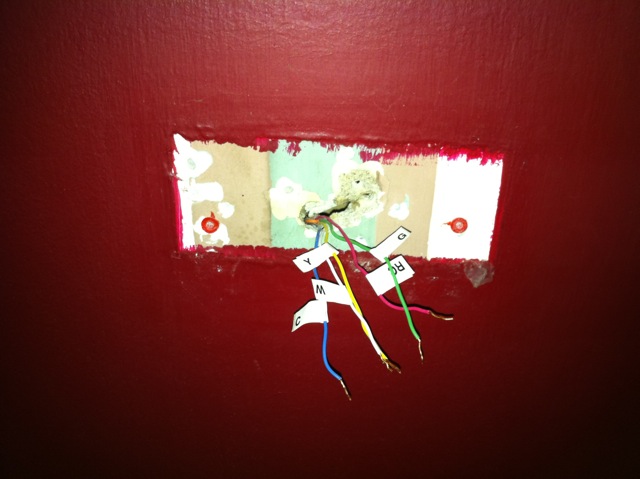 | |
| Remove old thermostat |
 |
| Wire and mount new thermostat |
 |
| Program and Save!!! |
Subscribe to:
Posts (Atom)